
Help Managing your world
BedrockMap
Show who's playing, and where, on your world's live map at bedrockmap.net, keep the map up to date by itself, and let players put markers on it from in game.
What it does
BedrockMap draws your Minecraft world as a map you can open in a browser. It's another myGen service, with its own account. Once a world is linked to its map, BedrockRelay can:
- put everyone who's playing on the map, where they are, every few seconds (Live players);
- give BedrockMap a fresh copy of the world whenever it asks, so the map keeps up with what's been built (Keeping the map up to date);
- let players add markers from in game (Markers from in game), and let other addons add theirs (Markers from other addons).
It works on dedicated servers and Realms. Nothing goes to BedrockMap until you link the world, and you switch each of these on in BedrockMap: BedrockRelay only carries what your map asks for.
Linking your world
You link a world from BedrockMap. In BedrockMap, open your world, go to World settings → Integrations → Bedrock Relay and choose Connect your world. That brings you here, with nothing to copy or paste.
- If you already use BedrockRelay, sign in with Discord when you're asked. Then choose which of your worlds the map is for, under Which world is…?, or Set up a new world. A world that's linked to another map says so, and choosing it moves it to this one. Your BedrockMap account is remembered, so next time you go straight to signing in.
- If you don't, choose No, continue without Discord. You get a BedrockRelay account just for your map, and set the world up for it: the pack over SFTP for a dedicated server, or a Microsoft sign-in for a Realm. The dashboard leaves out everything that needs Discord.
When it's linked, Go back to my map takes you to BedrockMap, where you choose what your map does with it. Later, Manage in Bedrock Relay on BedrockMap opens the world's Integrations tab here.
The tab's BedrockMap card shows the map's name, when players were last sent to it, which of its features are on, and a button to open it.
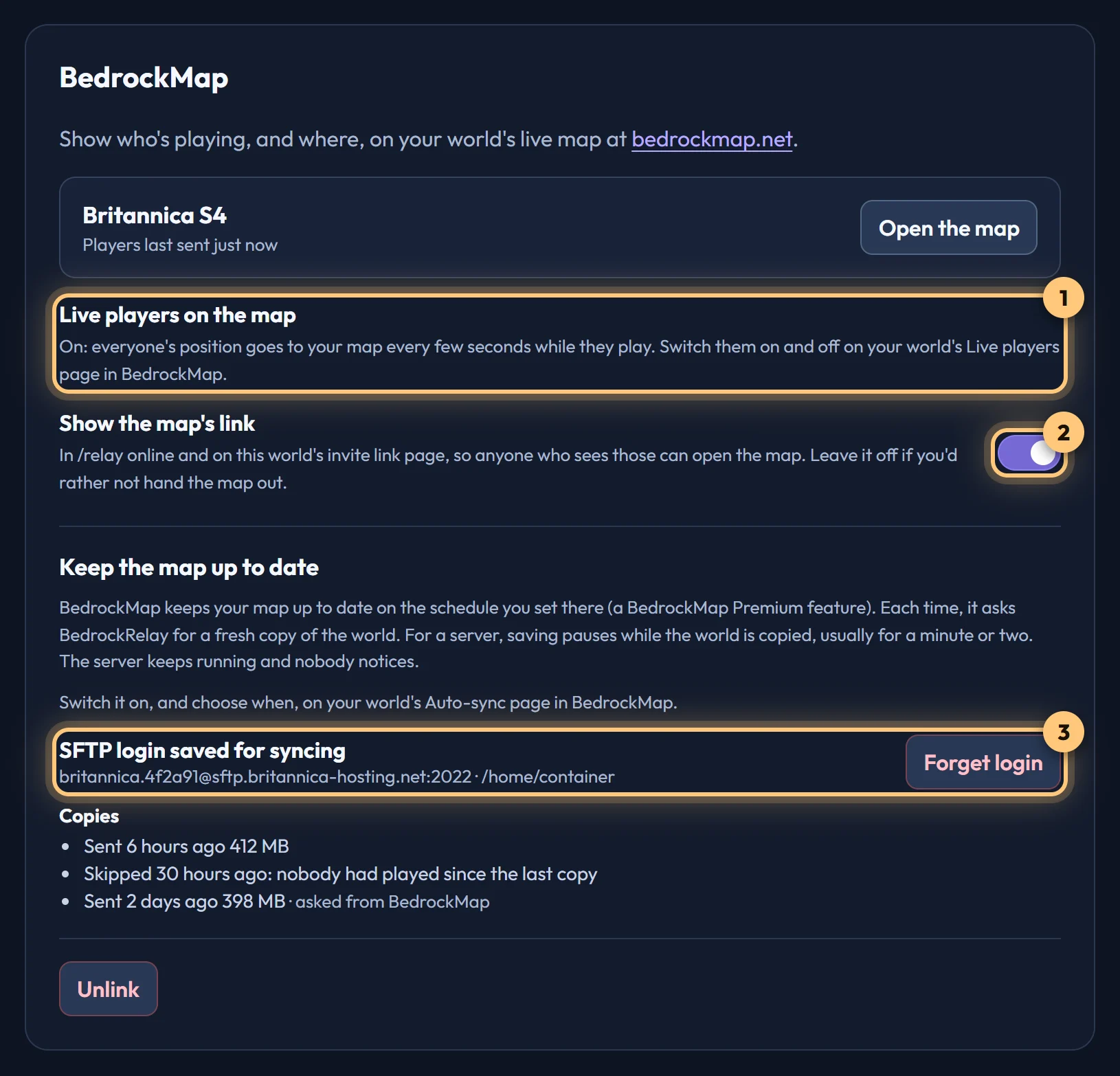
If you continued without Discord before and sign in with Discord now, you'll have two accounts. BedrockRelay offers to Move them here: the worlds of the account just for your map, with their settings and map links, become your Discord account's, and the other account stops working. Your Account page offers the same, says which BedrockMap account yours is linked to, and has Unlink, after which you're asked again next time.
Live players
Switch live players on and off on your world's Live players page in BedrockMap. While they're on, everyone online shows on the map where they are, updated every few seconds while they play. While they're off, BedrockRelay sends nothing. The card here says which.
- Live players are a BedrockMap Premium feature. Without Premium, the card says so, and players appear by themselves once the map has it.
- A dedicated server needs BedrockRelay pack v0.5.0 or later. Every Realm pack can do it. The card says if yours needs updating.
- Your map can be public, so anyone who opens it sees who's playing. In BedrockMap you can hide some players, or anyone underground.
- While relaying is switched off, nothing is sent to the map.
Keeping the map up to date
A map shows the world as it was when it was last drawn. BedrockMap can redraw it on a schedule you choose there, a BedrockMap Premium feature: switch it on, and choose when, on your world's Auto-sync page in BedrockMap. Each time, it asks BedrockRelay for a fresh copy of the world.
On a dedicated server, BedrockRelay copies the world over SFTP while it runs. The pack pauses saving for the minute or two that takes, so the copy is complete, then saves again. The server keeps running and nobody notices. It needs BedrockRelay pack v0.9.0 or later.
Nobody is there to type the password when BedrockMap asks, so the server's SFTP login is kept for this: the one time BedrockRelay keeps one. If it's missing, BedrockMap's Auto-sync page says so, and Set it up in Bedrock Relay brings you to the world's Integrations tab here to save it. It's tried before it's saved, kept encrypted, used only to copy this world for its map, and deleted when you choose Forget login, unlink the map or remove the world. If the login stops working, the card asks you to save it again.
On a Realm, BedrockRelay gives BedrockMap the Realm's latest backup, using your Microsoft sign-in. The Realm stays open, and there's nothing to save here.
If nobody has played since the last copy, BedrockRelay skips it: nothing has changed. The card lists the last few copies and how each went.
Markers from in game
The Map markers plugin lets players put markers on the map without leaving the game. Add it from the world's Plugins tab. It's offered only on a world linked to a map, and needs BedrockRelay pack v0.10.0 or the Realm pack v1.5.0.
- A player types
/relayin game and chooses Map markers. - Add a marker here puts one where they're standing, with a name, an optional description and one of your map's marker types.
- My markers lists the ones they placed, to delete one.
Your map decides who may place markers and how many it can hold, as it does on the website. If a player isn't allowed, or the map is full, the form tells them.
Markers from other addons
Other addons in your world can put markers on the map too, such as a death point or a waypoint, through BedrockRelay. You choose whether they may on BedrockMap, with Addons may add markers on your world's Developers page there, where each addon's markers are listed and can be removed. Addon authors: see Markers on BedrockMap.
Unlinking
Unlink on the card clears your players from the map at once, stops copies, and deletes the link and any SFTP login kept for copies. BedrockMap is told straight away, so it shows the world as not linked too. Unlinking it in BedrockMap does the same here.
If the link stops working on BedrockMap's side, the card says so and nothing more is sent until you connect the world again from BedrockMap. Removing the world unlinks it too.
What's shared with BedrockMap, and what's kept, is set out in the Privacy Policy.
Ready to connect a world, or need to change something?
Open the dashboard